

1040 Tax Form: What It Is and How to Fill It Out

Filing your federal income tax return can feel overwhelming, especially if you're unfamiliar with IRS Form 1040. This comprehensive guide will walk you through everything you need to know about the 1040 tax form—from understanding what it is to completing it accurately for the 2026 tax year.
Whether you're filing your first tax return or looking to maximize your deductions and credits, this article provides clear, IRS-backed information to help you navigate the process with confidence. We'll cover filing requirements, income reporting, available deductions, tax credits, and common mistakes to avoid.
Watch First: Before diving into the details, check out this helpful video overview of IRS Form 1040 and the federal tax filing process.
Watch this helpful overview of IRS Form 1040 and federal tax return filing requirements.
Form 1040 is the standard federal income tax return used by most U.S. taxpayers to report income, claim deductions and credits, calculate taxes owed, and determine refunds. The IRS uses Form 1040 to process annual federal tax returns and assess tax liability.
Table of Contents
- What Is Form 1040?
- Who Must File Form 1040?
- Filing Status Options Explained
- Income Reported on Form 1040
- Tax Deductions vs Tax Credits
- How Form 1040 Calculates Taxes
- How to Fill Out Form 1040 Step-by-Step
- Line-by-Line Form 1040 Instructions
- Form 1040 Schedules Explained
- Electronic Filing vs Paper Filing
- Tax Refunds and Payments
- Common Form 1040 Mistakes to Avoid
- How to Amend a Tax Return
- FAQs
What Is Form 1040?
IRS Form 1040 is the official U.S. Individual Income Tax Return form used by taxpayers to report their annual income to the Internal Revenue Service (IRS). This form serves as the foundation for calculating your federal tax liability, determining whether you owe additional taxes or are eligible for a refund.
According to the IRS, Form 1040 is the primary document through which individuals report wages, salaries, investment income, business earnings, and other sources of income. The form also allows taxpayers to claim various deductions and tax credits that can reduce their overall tax burden.
Key Purposes of Form 1040:
- Report all taxable income earned during the tax year
- Calculate adjusted gross income (AGI)
- Claim standard or itemized deductions
- Apply eligible tax credits
- Determine final tax liability or refund amount
- Report self-employment income and taxes
- Document tax payments already made through withholding or estimated payments
For the 2026 tax year, Form 1040 has been streamlined to make filing more accessible while still capturing all necessary information. Most taxpayers will use the standard Form 1040, though some may need to attach additional schedules depending on their financial situation.
This guide is based on official IRS Form 1040 instructions and educational tax resources.
Who Must File Form 1040?
Not everyone is required to file a federal tax return, but many people benefit from filing even when it's not mandatory. The IRS sets specific income thresholds that determine filing requirements based on your filing status, age, and type of income.
General Filing Requirements for 2026
You must file Form 1040 if your gross income meets or exceeds the following thresholds for the 2026 tax year:
| Filing Status | Under 65 | 65 or Older |
|---|---|---|
| Single | $14,600 | $16,550 |
| Married Filing Jointly | $29,200 | $31,150 (one spouse 65+) $33,100 (both spouses 65+) |
| Married Filing Separately | $5 | $5 |
| Head of Household | $21,900 | $23,850 |
| Qualifying Surviving Spouse | $29,200 | $31,150 |
Special Situations Requiring Filing
Even if your income falls below these thresholds, you must file Form 1040 if any of the following apply:
- Self-employment income: You earned $400 or more from self-employment
- Advance Premium Tax Credit: You received advance payments of the premium tax credit for health insurance
- Special taxes: You owe special taxes like alternative minimum tax, household employment taxes, or taxes on IRAs
- Health savings account: You received distributions from an HSA, Archer MSA, or Medicare Advantage MSA
- Foreign accounts: You have foreign financial assets requiring reporting
- Refund claim: You had taxes withheld and want to claim a refund
- Earned Income Credit: You qualify for the Earned Income Tax Credit (EITC)
Pro Tip: Even if you're not required to file, you should submit Form 1040 if you had federal income tax withheld from your paycheck. You may be entitled to a refund, and there's no penalty for filing when you don't owe taxes.
If you're unsure whether you need to file, use the IRS Free File tool or consult with a tax professional. You can also use our paycheck calculator to estimate your take-home pay and understand how federal taxes affect your earnings.
Filing Status Options Explained
Your filing status is one of the most important decisions when completing Form 1040. It determines your standard deduction amount, tax rates, and eligibility for various credits and deductions. The IRS recognizes five filing statuses:
1. Single
Use this status if you were unmarried, divorced, or legally separated according to your state's law on the last day of the tax year. You may also qualify as Single if you were widowed before the tax year began and didn't remarry.
2. Married Filing Jointly
This status is available to married couples who choose to file one combined tax return. Both spouses report their combined income, deductions, and credits. Filing jointly often results in a lower tax liability and provides access to more tax benefits than filing separately.
Benefits of Married Filing Jointly:
- Higher standard deduction ($29,200 for 2026)
- Lower tax rates on combined income
- Eligibility for education credits and deductions
- Ability to contribute to a Roth IRA with higher income limits
- Larger child and dependent care credits
3. Married Filing Separately
Married couples can choose to file separate returns. While this status typically results in higher taxes and fewer benefits, it may be advantageous in certain situations, such as when one spouse has significant medical expenses or when couples are separated or planning to divorce.
4. Head of Household
You qualify for Head of Household status if you:
- Were unmarried or considered unmarried on the last day of the year
- Paid more than half the cost of keeping up a home for the year
- Had a qualifying person (child or dependent) live with you for more than half the year
This status offers a higher standard deduction ($21,900 for 2026) and more favorable tax brackets than Single filing status.
5. Qualifying Surviving Spouse
Also known as Qualifying Widow(er) with Dependent Child, this status is available for two years following the year your spouse died. You must have a dependent child and meet specific requirements. This status allows you to use the same tax rates and standard deduction as Married Filing Jointly.
Important: Choosing the wrong filing status can cost you money in missed deductions and credits. Review the IRS guidelines carefully or consult a tax professional to ensure you select the most advantageous status for your situation.
Income Reported on Form 1040
Form 1040 requires you to report all taxable income from various sources. The IRS receives copies of information returns (like W-2s and 1099s) from employers and financial institutions, so it's crucial to report all income accurately.
Common Types of Income
Wages, Salaries, and Tips
Report wages from Form W-2 on line 1 of Form 1040. This includes salary, hourly wages, bonuses, commissions, and tips. Your employer should provide a W-2 by January 31st showing your total earnings and taxes withheld.
Interest and Dividends
Report interest income from bank accounts, savings bonds, and other investments. Dividend income from stocks and mutual funds must also be reported. You'll receive Form 1099-INT for interest and Form 1099-DIV for dividends if you earn more than $10.
Self-Employment Income
If you're self-employed, independent contractor, or own a business, report your income and expenses on Schedule C. Net profit from self-employment is subject to both income tax and self-employment tax (Social Security and Medicare).
Retirement Income
Distributions from traditional IRAs, 401(k) plans, pensions, and annuities are generally taxable. You'll receive Form 1099-R showing the distribution amount. Roth IRA distributions are typically tax-free if you meet certain requirements.
Social Security Benefits
Depending on your total income, up to 85% of your Social Security benefits may be taxable. Use the worksheet in the Form 1040 instructions to determine the taxable portion.
Other Income Sources
- Rental income: Report on Schedule E
- Capital gains: Report sales of stocks, bonds, and property on Schedule D
- Unemployment compensation: Fully taxable, reported on Schedule 1
- Alimony received: Taxable for divorce agreements executed before 2019
- Gambling winnings: Must be reported as "Other Income"
- Cryptocurrency transactions: Report gains and losses
Remember: The IRS receives copies of most information returns. Failing to report income can result in penalties, interest, and potential audits. When in doubt, report it.
Tax Deductions vs Tax Credits
Understanding the difference between tax deductions and tax credits is essential for minimizing your tax liability. Both can reduce what you owe, but they work in different ways.
Tax Deductions
Tax deductions reduce your taxable income. The value of a deduction depends on your tax bracket. For example, a $1,000 deduction saves you $220 if you're in the 22% tax bracket.
Standard Deduction vs Itemized Deductions
You can choose between taking the standard deduction or itemizing your deductions. Most taxpayers benefit from the standard deduction, which is a fixed amount based on your filing status:
| Filing Status | 2026 Standard Deduction |
|---|---|
| Single | $14,600 |
| Married Filing Jointly | $29,200 |
| Married Filing Separately | $14,600 |
| Head of Household | $21,900 |
| Qualifying Surviving Spouse | $29,200 |
Itemized deductions may be beneficial if your total qualifying expenses exceed the standard deduction. Common itemized deductions include:
- State and local taxes (capped at $10,000)
- Mortgage interest on qualified residences
- Charitable contributions
- Medical expenses exceeding 7.5% of AGI
- Casualty and theft losses from federally declared disasters
Tax Credits
Tax credits directly reduce your tax liability dollar-for-dollar, making them more valuable than deductions. A $1,000 tax credit saves you $1,000 in taxes regardless of your tax bracket.
Refundable vs Nonrefundable Credits
Refundable credits can reduce your tax liability below zero, resulting in a refund even if you owe no taxes. Examples include:
- Earned Income Tax Credit (EITC)
- Child Tax Credit (partially refundable)
- American Opportunity Tax Credit (partially refundable)
- Premium Tax Credit
Nonrefundable credits can reduce your tax liability to zero but won't result in a refund. Examples include:
- Lifetime Learning Credit
- Child and Dependent Care Credit
- Saver's Credit
- Residential Energy Credits
Popular Tax Credits for 2026:
- Child Tax Credit: Up to $2,000 per qualifying child under 17
- Earned Income Tax Credit: Up to $7,830 for taxpayers with three or more qualifying children
- American Opportunity Credit: Up to $2,500 per student for the first four years of college
- Lifetime Learning Credit: Up to $2,000 per tax return for qualified education expenses
- Saver's Credit: Up to $2,000 ($4,000 if married filing jointly) for retirement contributions
How Form 1040 Calculates Taxes
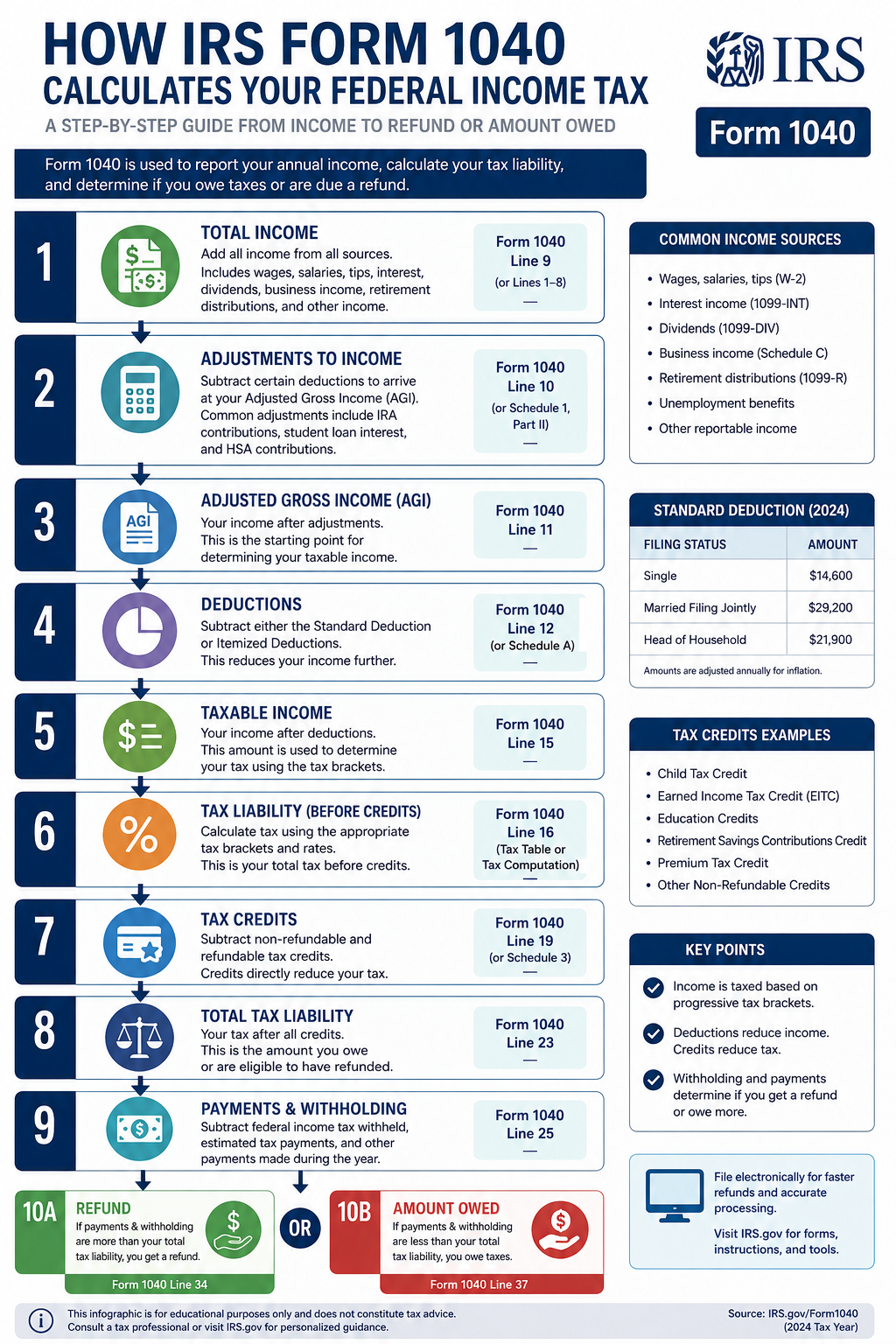
Understanding how Form 1040 calculates your tax liability helps you plan better and avoid surprises. Here's the step-by-step calculation process:
The Tax Calculation Formula
- Total Income: Add all sources of income (wages, interest, dividends, business income, etc.)
- Adjustments to Income: Subtract above-the-line deductions (IRA contributions, student loan interest, educator expenses, etc.) to arrive at Adjusted Gross Income (AGI)
- Adjusted Gross Income (AGI): This is your total income minus adjustments. AGI is important because many deductions and credits have AGI limitations
- Deductions: Subtract either the standard deduction or itemized deductions from your AGI
- Taxable Income: This is your AGI minus deductions. This is the amount subject to federal income tax
- Tax Calculation: Apply the appropriate tax brackets to your taxable income to calculate your total tax
- Tax Credits: Subtract tax credits from your total tax
- Other Taxes: Add any additional taxes (self-employment tax, alternative minimum tax, etc.)
- Total Tax: This is your final tax liability before payments
- Payments and Refundable Credits: Subtract federal income tax withheld, estimated tax payments, and refundable credits
- Refund or Amount Owed: If payments exceed total tax, you get a refund. If total tax exceeds payments, you owe the difference
2026 Tax Brackets
The U.S. uses a progressive tax system with seven tax brackets. Your income is taxed at different rates as it moves through each bracket:
| Tax Rate | Single | Married Filing Jointly |
|---|---|---|
| 10% | Up to $11,600 | Up to $23,200 |
| 12% | $11,601 - $47,150 | $23,201 - $94,300 |
| 22% | $47,151 - $100,525 | $94,301 - $201,050 |
| 24% | $100,526 - $191,950 | $201,051 - $383,900 |
| 32% | $191,951 - $243,725 | $383,901 - $487,450 |
| 35% | $243,726 - $609,350 | $487,451 - $731,200 |
| 37% | Over $609,350 | Over $731,200 |
Important Note: Being in a higher tax bracket doesn't mean all your income is taxed at that rate. Only the income within each bracket is taxed at that bracket's rate. This is why understanding marginal tax rates is crucial for tax planning.
To estimate your take-home pay and understand how federal taxes affect your paycheck, try our salary after taxes calculator.
How to Fill Out Form 1040 Step-by-Step
Now that you understand the basics, let's walk through completing Form 1040. Gather all your tax documents before starting, including W-2s, 1099s, receipts for deductions, and last year's tax return.
Preparation Steps
- Gather Documents: Collect all W-2s, 1099s, receipts, and tax records
- Choose Filing Method: Decide between e-filing and paper filing
- Determine Filing Status: Select the appropriate filing status
- Calculate Dependents: Identify qualifying children and dependents
Completing the Form
The modern Form 1040 is designed to be straightforward, with most taxpayers only needing to complete the main form and possibly one or two schedules. Here's what to expect:
Before You Begin:
- Have your Social Security Number (and spouse's if filing jointly) ready
- Gather all income statements (W-2, 1099 forms)
- Collect records of deductible expenses
- Review last year's return for reference
- Decide whether to itemize or take the standard deduction
Line-by-Line Form 1040 Instructions
Here's a detailed breakdown of the key lines on Form 1040:
Personal Information (Top of Form)
- Name and Address: Enter your legal name exactly as it appears on your Social Security card
- Social Security Number: Enter your SSN (and spouse's if filing jointly)
- Filing Status: Check the appropriate box (Single, Married Filing Jointly, etc.)
- Dependents: List qualifying children and dependents with their SSNs
Income Section (Lines 1-9)
- Line 1 - Wages: Enter total wages from all W-2 forms
- Line 2a - Tax-Exempt Interest: Report tax-exempt interest (informational only)
- Line 2b - Taxable Interest: Enter taxable interest from Form 1099-INT
- Line 3a - Qualified Dividends: Report qualified dividends taxed at lower rates
- Line 3b - Ordinary Dividends: Enter total dividends from Form 1099-DIV
- Line 4a - IRA Distributions: Report total IRA distributions
- Line 4b - Taxable IRA Amount: Enter the taxable portion
- Line 5a - Pensions/Annuities: Report total pension/annuity payments
- Line 5b - Taxable Amount: Enter taxable portion
- Line 6a - Social Security Benefits: Report total benefits received
- Line 6b - Taxable Benefits: Enter taxable portion (if any)
Adjusted Gross Income Section
- Line 7 - Additional Income: Report income from Schedule 1 (business income, unemployment, etc.)
- Line 8 - Total Income: Add lines 1-7
- Line 9 - Adjustments: Enter adjustments from Schedule 1 (IRA contributions, student loan interest, etc.)
- Line 10 - Adjusted Gross Income (AGI): Subtract line 9 from line 8
Tax and Credits Section
- Line 11 - Standard/Itemized Deduction: Enter your deduction amount
- Line 12 - Qualified Business Income Deduction: If applicable, from Form 8995
- Line 13 - Taxable Income: Subtract lines 11 and 12 from line 10
- Line 14 - Tax: Calculate tax using tax tables or worksheets
- Line 15 - Additional Taxes: From Schedule 2 (self-employment tax, AMT, etc.)
- Line 16 - Total Tax: Add lines 14 and 15
- Line 17 - Credits: Enter credits from Schedule 3 (child tax credit, education credits, etc.)
- Line 18 - Total Tax After Credits: Subtract line 17 from line 16
Payments and Refund Section
- Line 19 - Federal Tax Withheld: From W-2s and 1099s
- Line 20 - Estimated Tax Payments: Enter quarterly payments made
- Line 21 - Earned Income Credit: If eligible
- Line 22 - Additional Credits: From Schedule 3
- Line 23 - Total Payments: Add lines 19-22
- Line 24 - Amount Owed: If line 18 is greater than line 23
- Line 25 - Refund: If line 23 is greater than line 18
Download Official Form 1040
Get the official IRS Form 1040 directly from the Internal Revenue Service. Always use the most current version from the IRS website.
Download Form 1040 PDFReview IRS instructions carefully before filing
Form 1040 Schedules Explained
Depending on your tax situation, you may need to attach additional schedules to your Form 1040. Here are the most common schedules:
Schedule 1 - Additional Income and Adjustments
Use Schedule 1 to report:
- Business income or loss (from Schedule C)
- Rental real estate income (from Schedule E)
- Unemployment compensation
- Alimony received
- IRA contributions
- Student loan interest deduction
- Educator expenses
- Health Savings Account (HSA) deductions
Schedule 2 - Additional Taxes
Use Schedule 2 to report:
- Alternative Minimum Tax (AMT)
- Self-employment tax
- Additional Medicare tax
- Net Investment Income Tax
- Repayment of excess premium tax credit
Schedule 3 - Additional Credits and Payments
Use Schedule 3 to report:
- Foreign tax credit
- General business credit
- Residential energy credits
- Education credits
- Retirement savings contributions credit (Saver's Credit)
- Estimated tax payments
- Amount paid with extension request
Schedule A - Itemized Deductions
Use Schedule A if you're itemizing deductions instead of taking the standard deduction. Report:
- Medical and dental expenses (over 7.5% of AGI)
- State and local taxes (capped at $10,000)
- Home mortgage interest
- Charitable contributions
- Casualty and theft losses
- Miscellaneous deductions (limited)
Schedule B - Interest and Ordinary Dividends
Required if you received over $1,500 in taxable interest or ordinary dividends, or if you had foreign accounts.
Schedule C - Profit or Loss from Business
Use Schedule C if you're self-employed or a sole proprietor. Report business income and deduct business expenses to calculate net profit or loss.
Schedule D - Capital Gains and Losses
Report sales of stocks, bonds, real estate, and other capital assets. Calculate capital gains and losses, which are taxed at preferential rates.
Schedule E - Supplemental Income and Loss
Report income from rental properties, royalties, partnerships, S corporations, estates, and trusts.
Schedule SE - Self-Employment Tax
Calculate self-employment tax (Social Security and Medicare) if you have net self-employment earnings of $400 or more.
Tip: Tax software can automatically determine which schedules you need based on your answers to interview questions. This eliminates guesswork and ensures you don't miss required forms.
Electronic Filing vs Paper Filing
When it's time to submit your Form 1040, you have two options: electronic filing (e-file) or traditional paper filing. Here's what you need to know about each method:
Electronic Filing (E-file)
E-filing is the fastest, safest, and most accurate way to file your tax return. The IRS strongly encourages taxpayers to e-file, and over 90% of returns are now filed electronically.
Benefits of E-filing:
- Faster refunds: Receive your refund in as little as 21 days with direct deposit
- Greater accuracy: Software checks for errors and missing information
- Confirmation of receipt: Get electronic confirmation within 24-48 hours
- Secure transmission: Encrypted data protects your information
- Convenient payment options: Pay electronically if you owe taxes
- Free filing options: Many taxpayers qualify for free e-filing through IRS Free File
E-filing Options:
- IRS Free File: Free tax preparation and e-filing for taxpayers with AGI below $79,000
- Commercial tax software: Programs like TurboTax, H&R Block, TaxAct
- Tax professional: CPAs and enrolled agents can e-file on your behalf
- Free File Fillable Forms: Electronic versions of IRS forms for all income levels (best for experienced filers)
Paper Filing
While less common, you can still file a paper return by mailing your completed Form 1040 to the appropriate IRS address.
When Paper Filing Might Make Sense:
- You have complex situations not supported by e-filing software
- You prefer keeping physical copies of everything
- You lack reliable internet access
- You're filing an amended return (Form 1040-X) for certain years
Drawbacks of Paper Filing:
- Slower processing: Refunds can take 6-8 weeks or longer
- Higher error rate: Mathematical mistakes are more common
- No confirmation: No immediate confirmation the IRS received your return
- Mailing costs: Postage and potential certified mail fees
- Lost mail risk: Returns can be lost or delayed in the mail
| Feature | E-file | Paper Filing |
|---|---|---|
| Refund Speed | 21 days or less | 6-8 weeks |
| Error Rate | Less than 1% | About 20% |
| Confirmation | Within 48 hours | None |
| Payment Options | Multiple electronic options | Check or money order |
| Cost | Free to $150+ | Postage only |
IRS Recommendation: The IRS processes e-filed returns faster and more accurately. If you owe taxes, e-filing with electronic payment is the safest and most convenient option.
Tax Refunds and Payments
After completing Form 1040, you'll either owe taxes or receive a refund. Here's what you need to know about both scenarios:
Receiving a Tax Refund
If you overpaid your taxes through withholding or estimated payments, the IRS will refund the difference.
Refund Options:
- Direct Deposit: Fastest method—receive your refund in 21 days or less. You can split your refund among up to three accounts.
- Paper Check: Mailed to your address on file. Takes 6-8 weeks.
- U.S. Savings Bonds: Purchase paper or electronic savings bonds with your refund.
- Apply to Next Year: Apply all or part of your refund to next year's estimated taxes.
Tracking Your Refund:
Use the IRS "Where's My Refund?" tool at irs.gov/refunds or the IRS2Go mobile app. You'll need:
- Your Social Security Number
- Your filing status
- Your exact refund amount
Paying Taxes Owed
If you owe taxes, you must pay by the filing deadline (typically April 15) to avoid penalties and interest.
Payment Options:
- Electronic Federal Tax Payment System (EFTPS): Free, secure online payment system
- Direct Pay: Pay directly from your checking or savings account at no cost
- Debit or Credit Card: Pay online, by phone, or mobile device (processing fees apply)
- Electronic Funds Withdrawal: Schedule payment when e-filing
- Check or Money Order: Mail with payment voucher (Form 1040-V)
- Cash: Pay at participating retail partners (limits apply)
- Installment Agreement: Set up a monthly payment plan if you can't pay in full
Important: If you can't pay your full tax bill, file your return on time anyway to avoid the much larger failure-to-file penalty (5% per month vs. 0.5% per month for failure to pay). Contact the IRS to discuss payment options.
Penalties and Interest:
- Failure-to-file penalty: 5% of unpaid taxes per month (max 25%)
- Failure-to-pay penalty: 0.5% of unpaid taxes per month (max 25%)
- Interest: Charged on unpaid taxes and penalties at the federal short-term rate plus 3%
Common Form 1040 Mistakes to Avoid
Even experienced taxpayers make mistakes on their tax returns. Avoid these common errors to prevent delays, penalties, and potential audits:
Mathematical Errors
Simple addition and subtraction mistakes are surprisingly common. Double-check all calculations or use tax software that automatically computes totals.
Incorrect Social Security Numbers
A single digit error in an SSN can delay your refund or cause your return to be rejected. Verify all SSNs against Social Security cards.
Wrong Filing Status
Choosing the incorrect filing status can cost you hundreds or thousands of dollars in missed deductions and credits. Review the requirements carefully.
Missing Income
Failing to report all income is one of the most serious mistakes. The IRS receives copies of W-2s and 1099s, so unreported income will likely trigger a notice.
Incorrect Bank Account Information
Entering the wrong routing or account number for direct deposit can delay your refund by months. Verify account information carefully.
Forgetting to Sign
An unsigned return is invalid. If filing jointly, both spouses must sign. For paper returns, this mistake will result in your return being rejected.
Claiming Ineligible Dependents
Only claim dependents who meet IRS requirements. Both parents cannot claim the same child, and the child must meet relationship, age, residency, and support tests.
Missing Deadlines
Filing late or paying late results in penalties. File by April 15 (or request an extension) and pay any taxes owed by the deadline.
Not Keeping Records
Keep copies of your tax return and supporting documents for at least three years. You may need them for loans, applications, or if the IRS questions your return.
Overlooking Deductions and Credits
Many taxpayers miss valuable deductions and credits they're eligible for. Review all available tax benefits or consult a tax professional.
How to Avoid Mistakes:
- Use reputable tax preparation software
- Review your return carefully before submitting
- Keep organized records throughout the year
- File electronically to catch errors automatically
- Consult a tax professional for complex situations
- Don't rush—take time to complete your return accurately
How to Amend a Tax Return
If you discover an error after filing your Form 1040, don't panic. You can file an amended return using Form 1040-X, Amended U.S. Individual Income Tax Return.
When to File an Amended Return
You should file Form 1040-X if you need to:
- Correct your filing status
- Adjust your income, deductions, or credits
- Add or remove dependents
- Claim a deduction or credit you missed
- Report additional income you forgot
When NOT to File an Amended Return
- Math errors (the IRS will correct these automatically)
- Missing forms or schedules (the IRS will request these)
- To claim a refund for a year where you didn't file originally (file the original return instead)
How to File Form 1040-X
- Download Form 1040-X: Get the form from IRS.gov
- Complete Column A: Enter amounts from your original return
- Complete Column B: Enter the net change (increase or decrease)
- Complete Column C: Enter the corrected amounts
- Explain changes: Provide a clear explanation in Part III
- Attach schedules: Include any new or changed forms/schedules
- Sign and mail: Mail to the address in the instructions
Important Deadlines
- To claim a refund: File within 3 years of the original filing date or 2 years from when you paid the tax, whichever is later
- If you owe additional tax: File as soon as possible to limit penalties and interest
Processing Time
Amended returns take longer to process than original returns—typically 16 weeks or more. You can track your amended return using the "Where's My Amended Return?" tool on IRS.gov.
Note: As of 2026, the IRS accepts electronically filed Form 1040-X for recent tax years, which speeds up processing. Check IRS.gov for current e-filing availability.
Calculate Your Take-Home Pay
Understanding your federal tax liability is just one piece of the puzzle. See how federal, state, and local taxes affect your actual paycheck.
Calculate Your Take-Home Pay Now1040 Tax Form: What It Is and How to Fill It Out – FAQs
What is the difference between Form 1040 and Form 1040-SR?
Form 1040-SR is a variation of Form 1040 designed for taxpayers age 65 and older. It features larger print and a standard deduction chart for easier reading. Both forms have the same tax rates, deductions, and credits. Seniors can choose either form—there's no advantage to one over the other except readability. If you're under 65, you must use the standard Form 1040.
Can I file Form 1040 for free?
Yes, many taxpayers can file for free. If your adjusted gross income is below $79,000, you qualify for IRS Free File, which provides free tax preparation software from commercial providers. If you earn more than $79,000, you can use Free File Fillable Forms, which are electronic versions of IRS paper forms. Additionally, volunteers through the Volunteer Income Tax Assistance (VITA) program offer free tax help to qualifying individuals, including those with disabilities, limited English proficiency, and low-to-moderate income taxpayers.
What happens if I file my Form 1040 late?
If you file late and owe taxes, you'll face a failure-to-file penalty of 5% of your unpaid taxes for each month or part of a month your return is late, up to 25%. If you're due a refund, there's no penalty for filing late, but you must file within three years of the original due date to claim your refund. After three years, the refund is forfeited. If you can't file on time, submit Form 4868 to request a six-month extension, but remember that an extension to file is not an extension to pay—any taxes owed are still due by the original deadline.
Do I need to file Form 1040 if I had no income?
Generally, if you had no income, you're not required to file Form 1040. However, you should file if you had taxes withheld from your paycheck and want to claim a refund, or if you qualify for refundable tax credits like the Earned Income Tax Credit or the Premium Tax Credit. Additionally, if you're self-employed and had net earnings of $400 or more, you must file even if your total income was below the filing threshold. Filing may also be beneficial to establish a record of income for loan applications or to start the statute of limitations period.
How long should I keep my Form 1040 and supporting documents?
The IRS recommends keeping copies of your tax returns and supporting documents for at least three years from the date you filed your original return or two years from the date you paid the tax, whichever is later. This is the standard statute of limitations for IRS audits. However, keep records for six years if you underreported income by more than 25%, and indefinitely if you filed a fraudulent return or didn't file at all. Keep records related to property (like home purchases or stock purchases) for as long as you own the asset plus three years after you sell it, as you'll need them to calculate capital gains or losses.
Can I file Form 1040 if I live abroad?
Yes, U.S. citizens and resident aliens must file Form 1040 regardless of where they live, reporting worldwide income. However, if you live abroad, you may qualify for the Foreign Earned Income Exclusion (Form 2555), which allows you to exclude up to $126,500 (2026 amount) of foreign earned income from U.S. taxation. You may also claim the Foreign Tax Credit for taxes paid to foreign governments. The filing deadline for expatriates is automatically extended to June 15, though any taxes owed are still due by April 15 to avoid interest charges.
What if I can't pay the taxes I owe on Form 1040?
If you can't pay your full tax bill, file your return on time anyway to avoid the much larger failure-to-file penalty. The IRS offers several payment options: you can set up an installment agreement to pay monthly, request an offer in compromise to settle for less than you owe, or request a temporary delay if paying would cause financial hardship. Interest and penalties will continue to accrue, but the failure-to-pay penalty is only 0.5% per month. Contact the IRS immediately to discuss your options—the longer you wait, the more penalties and interest accumulate.
Is Form 1040 the same as a W-2?
No, Form 1040 and Form W-2 are completely different documents. Form W-2 is provided by your employer and reports your wages and taxes withheld for the year. You use the information from your W-2 to complete Form 1040, which is your personal income tax return filed with the IRS. Think of the W-2 as a statement from your employer and Form 1040 as your official tax return. You'll receive a W-2 from each employer, but you only file one Form 1040 (plus any necessary schedules) per year.
What's the easiest way to complete Form 1040?
The easiest and most accurate way to complete Form 1040 is using tax preparation software. Programs like TurboTax, H&R Block, and TaxAct guide you through an interview process, asking questions in plain language and automatically filling in the appropriate forms. The software checks for errors, identifies deductions and credits you might miss, and allows you to e-file for faster processing. If your tax situation is simple, free options like IRS Free File or Credit Karma Tax may suffice. For complex situations, consider hiring a tax professional who can e-file on your behalf.
Can I use FreeAiden tools to help with tax preparation?
While FreeAiden offers helpful productivity tools like QR code generators, barcode generators, PDF converters, and image tools that can assist with organizing documents, it doesn't provide tax preparation software. For actually completing Form 1040, you should use dedicated tax software, IRS Free File, or consult a tax professional. However, FreeAiden's PDF tools might help you convert and organize tax documents, and their productivity utilities could assist with managing your tax-related files throughout the year.
Disclaimer
This guide is provided for educational purposes only and is based on official IRS Form 1040 instructions and publicly available tax information. Please note:
- Tax situations vary significantly between individuals, and this guide may not address your specific circumstances
- IRS rules, tax rates, and forms change annually—always verify current information on IRS.gov
- This content does not constitute legal, tax, or financial advice
- You should consult with a qualified tax professional or CPA for personalized tax advice
- The authors and publishers are not responsible for any errors, omissions, or damages resulting from the use of this information
- Always review official IRS instructions and publications before filing your tax return
Final Thoughts
Understanding Form 1040 and how to complete it correctly is essential for every U.S. taxpayer. While the form may seem complex at first, breaking it down into manageable sections makes the process much more approachable. Remember that the IRS provides extensive resources, including detailed instructions, publications, and free filing options to help you succeed.
Key takeaways from this guide:
- Form 1040 is the standard federal income tax return used by most taxpayers
- Filing requirements depend on your income, filing status, and age
- Choosing the right filing status and deductions can significantly impact your tax liability
- E-filing is faster, safer, and more accurate than paper filing
- Keep organized records and file on time to avoid penalties
- Don't hesitate to seek professional help for complex tax situations
Tax laws change frequently, so always verify the latest information on IRS.gov before filing. Whether you're filing your first return or you're a seasoned taxpayer, taking the time to understand Form 1040 will help you file accurately, claim all eligible benefits, and avoid costly mistakes.
Ready to Calculate Your Taxes?
Now that you understand Form 1040, see how federal taxes impact your actual paycheck. Our calculator helps you estimate your take-home pay with precision.
Use Our Paycheck CalculatorRemember: When in doubt, consult a qualified tax professional or contact the IRS directly for guidance specific to your situation.