

Schedule 3 (Form 1040): What It Is and How to Fill It Out
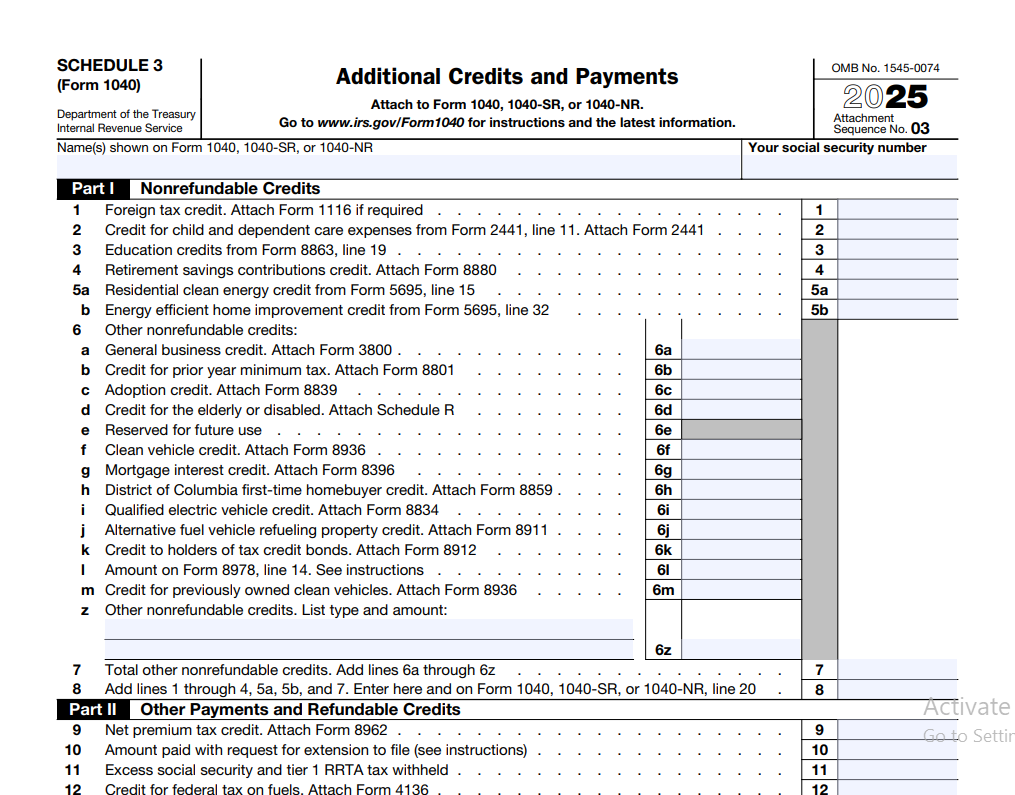
If you are claiming certain tax credits or have made additional payments toward your federal taxes, you may need to attach Schedule 3 (Form 1040) to your return. This form is where you report nonrefundable credits like the foreign tax credit, education credits, and the retirement savings contribution credit, as well as refundable payments such as the net premium tax credit or an extension payment. Understanding how this schedule works can help you lower your tax bill or boost your refund, without making errors that delay processing.
This guide is based on official IRS Schedule 3 (Form 1040) instructions and educational tax resources. Whether you prepare your own taxes or simply want to understand the forms behind your refund, you will find clear, step-by-step explanations for every line.
Schedule 3 (Form 1040) is a supplemental IRS form that taxpayers attach to their individual income tax return to report certain nonrefundable tax credits, such as the foreign tax credit and education credits, as well as additional payments and refundable credits like the net premium tax credit and excess Social Security tax withheld.
Table of Contents
- What Is Schedule 3 (Form 1040)?
- Who Needs to File Schedule 3?
- When Is Schedule 3 Required?
- How Schedule 3 Works with Form 1040
- Understanding Nonrefundable Tax Credits
- Understanding Additional Payments and Refundable Credits
- Line-by-Line Instructions
- How to Fill Out Schedule 3 Step-by-Step
- Common Schedule 3 Filing Mistakes
- Examples of When Schedule 3 Is Needed
- Schedule 3 vs Other IRS Schedules
- Schedule 3 (Form 1040): What It Is and How to Fill It Out – FAQs
- Before You File Schedule 3
What Is Schedule 3 (Form 1040)?
Schedule 3 is an additional form that accompanies your main Form 1040 U.S. Individual Income Tax Return. Its official title is "Additional Credits and Payments," and it serves two distinct purposes. First, in Part I, you list nonrefundable tax credits that can reduce your total tax liability. Second, in Part II, you report other payments and refundable credits that are treated like money already paid toward your tax bill.
Unlike some schedules that calculate income adjustments or deductions, Schedule 3 focuses entirely on amounts that directly lower the tax you owe or increase your refund. This makes it an important form for families, students, homeowners who installed solar panels, and anyone who paid foreign taxes or made an extension payment.
The IRS updates this form annually. For the 2026 filing season (tax year 2025), the structure remains similar to prior years, but you should always download the latest version from IRS.gov.
Who Needs to File Schedule 3?
You must file Schedule 3 if any of these situations apply:
- You claim a nonrefundable credit that is reported on Part I, such as the foreign tax credit, child and dependent care credit, education credits, retirement savings contributions credit, residential energy credits, or a general business credit.
- You received advance payments of the premium tax credit and need to reconcile them using Form 8962, resulting in a net premium tax credit.
- You paid an amount when you requested an extension of time to file your tax return.
- You had excess Social Security or Tier 1 RRTA tax withheld because you worked for more than one employer.
- You are claiming the credit for federal tax on fuels.
- You have other refundable credits or payments that the IRS instructs you to enter on Schedule 3.
Taxpayers who only claim refundable credits like the earned income credit or the additional child tax credit do not use Schedule 3 for those items. Those credits go directly on Form 1040.
When Is Schedule 3 Required?
Schedule 3 becomes required the moment one of the qualifying credits or payments applies to your return. There is no separate income threshold. For example, even if your income is low, you must attach Schedule 3 if you paid foreign taxes on investment income and want to claim the foreign tax credit. Similarly, if you requested a filing extension and sent a payment, you must include Schedule 3 to get credit for that payment.
According to IRS guidance, you should never skip this schedule if you are claiming a credit listed in its Part I, because the total from that section flows to Form 1040 and reduces your tax. Omitting it will cause your tax to be overstated.
How Schedule 3 Works with Form 1040
Schedule 3 acts like a bridge between detailed credit calculations and the main tax form. After you complete your Form 1040 through line 19 (which is your total tax before credits), you look to Schedule 3 to subtract eligible nonrefundable credits. The total of Part I goes to Form 1040, line 20. Then later, refundable credits and payments from Schedule 3 Part II go to Form 1040, line 31, adding to your total payments.
(Reduces tax)
(Increases refund or reduces balance due)
This two-part integration is why Schedule 3 can both lower your tax liability and increase the refund you receive. Nonrefundable credits stop at zero tax, while refundable amounts can push your refund above what you actually paid in.
Understanding Nonrefundable Tax Credits
Part I of Schedule 3 is dedicated to nonrefundable credits. These credits reduce your income tax dollar for dollar, but they cannot reduce your tax below zero. If your total nonrefundable credits exceed your tax liability, the excess is generally lost. However, some credits have a carryforward provision, letting you apply the unused portion to a future year.
Foreign Tax Credit (Line 1)
If you paid income taxes to a foreign country on income that is also taxed by the United States, you may be able to claim the foreign tax credit. For most taxpayers, if the total foreign taxes paid are $300 or less ($600 if married filing jointly), you can enter the amount directly on line 1 without filing Form 1116. Above that threshold, you must complete Form 1116 and attach it. The credit cannot be more than your U.S. tax on the foreign income.
Child and Dependent Care Credit (Line 2)
This credit helps offset the cost of care for a qualifying child under age 13 or a dependent who is physically or mentally incapable of self-care, so you can work or look for work. You figure the credit on Form 2441. It is nonrefundable on Schedule 3, meaning it can only reduce tax to zero. Be sure to have your care provider’s name, address, and taxpayer identification number.
Education Credits (Line 3)
The nonrefundable portion of the American Opportunity Credit and the Lifetime Learning Credit are entered here. Both come from Form 8863, line 19. The American Opportunity Credit is partially refundable; the refundable part (40% of the credit) goes directly on Form 1040, line 29, not Schedule 3. Only the nonrefundable remainder lands on line 3.
Retirement Savings Contributions Credit (Line 4)
Often called the Saver’s Credit, this nonrefundable credit is for eligible contributions to an IRA, 401(k), or similar retirement plan. Your credit rate (50%, 20%, or 10%) depends on your adjusted gross income and filing status. Use Form 8880 to calculate the exact amount. Because it is nonrefundable, it only helps if you have a tax liability.
Residential Energy Credits (Line 5)
Lines 5a and 5b cover two types of energy-related credits from Form 5695. Line 5a is for the Residential Clean Energy Credit (solar electric panels, solar water heating, geothermal heat pumps, etc.). This credit is 30% of the cost for most property placed in service through 2032. If you cannot use the full credit, it can be carried forward. Line 5b covers the Energy Efficient Home Improvement Credit for items like insulation, windows, and doors. Both are nonrefundable.
General Business Credit and Other Credits (Line 6)
If you have a general business credit from Form 3800, or other nonrefundable credits not listed on lines 1-5, they go on line 6. Attach the required forms and identify the type of credit. This line also includes credits like the credit for prior year minimum tax or the mortgage interest credit.
Understanding Additional Payments and Refundable Credits
Part II of Schedule 3 is often misunderstood. Despite the section’s general label, it does not report additional taxes you owe. Additional taxes are reported on Schedule 2. Instead, Part II lists payments you have already made and refundable credits that can increase your refund even if your tax is zero.
Net Premium Tax Credit (Line 8)
If you enrolled in health insurance through the Marketplace and received advance payments of the premium tax credit, you must reconcile those payments using Form 8962. If the reconciliation shows you are entitled to more credit than was paid on your behalf, the net premium tax credit is entered here. This is a refundable credit, so it can generate a refund beyond your withholding.
Amount Paid with Request for Extension to File (Line 10)
When you file Form 4868 to get an automatic six-month extension, you may send a payment to cover the tax you expect to owe. That payment must be reported on Schedule 3, line 10. Failing to include it means the IRS won’t credit your account properly, and your return will show a balance due that isn’t correct.
Excess Social Security and Tier 1 RRTA Tax Withheld (Line 11)
If you worked for two or more employers in the same year and your total Social Security tax withheld exceeded the annual maximum ($9,932.40 for 2025), you can claim the excess as a credit. This is refundable. Keep your W-2 forms as evidence.
Credit for Federal Tax on Fuels (Line 12)
Businesses, farmers, and certain other taxpayers who purchased fuel for off-highway use, farming, or other nontaxable purposes may claim this credit. File Form 4136. Any amount you are entitled to is refundable.
Other Payments and Refundable Credits (Line 13)
Use this line for refundable credits not listed above, such as the qualified sick and family leave credits for self-employed individuals. Attach the appropriate IRS form and include a clear description.
Line-by-Line Instructions for Schedule 3
Here is a practical walkthrough of each line as it appears on the official IRS Schedule 3. Always refer to your specific year’s form and instructions, as line numbers may shift slightly.
Line 1 – Foreign tax credit. Enter foreign taxes paid on income, up to $300 single ($600 MFJ) without Form 1116. If more, attach Form 1116.
Line 2 – Child and dependent care credit. Amount from Form 2441, line 11.
Line 3 – Education credits. Nonrefundable part from Form 8863, line 19.
Line 4 – Retirement savings contributions credit. From Form 8880, line 12.
Line 5a – Residential clean energy credit. From Form 5695, line 30.
Line 5b – Energy efficient home improvement credit. Also from Form 5695, if applicable.
Line 6 – Other nonrefundable credits. Identify the credit, enter the amount, attach required forms.
Line 7 – Total nonrefundable credits. Add lines 1 through 6. This goes to Form 1040, line 20.
Line 8 – Net premium tax credit. From Form 8962, line 26.
Line 10 – Amount paid with extension to file. The exact payment you made when requesting an extension.
Line 11 – Excess social security and tier 1 RRTA tax withheld. Sum of excess from all W-2s.
Line 12 – Credit for federal tax on fuels. From Form 4136.
Line 13 – Other payments and refundable credits. Describe and enter amount; attach form.
Line 14 – Total other payments and refundable credits. Add lines 8 through 13. Goes to Form 1040, line 31.
How to Fill Out Schedule 3 Step-by-Step
Follow these steps to complete Schedule 3 accurately.
- Gather your supporting forms. Before you begin, have Form 1116 (if needed), Form 2441, Form 8863, Form 8880, Form 5695, Form 8962, and any W-2s showing excess Social Security tax.
- Fill in your personal information. Your name and Social Security number must match Form 1040 exactly.
- Complete Part I. Work through each line, entering only credits you qualify for. Double-check that each amount is nonrefundable. Do not include refundable portions here.
- Add lines 1 through 6 and enter the total on line 7. This is the amount that will lower your tax on Form 1040.
- Move to Part II. Enter the net premium tax credit, extension payment, excess Social Security, fuel credit, and any other refundable amounts.
- Total Part II on line 14. This will be added to your total payments on Form 1040.
- Transfer the totals. Record line 7 on Form 1040, line 20. Record line 14 on Form 1040, line 31.
- Attach all required forms. If you don’t include Form 5695 or Form 2441, the IRS may disallow the credit.
Download the official Schedule 3 (Form 1040) PDF
Download Schedule 3 (Form 1040)Review the official IRS instructions before filing your return.
Common Schedule 3 Filing Mistakes
Avoid these frequent errors that can slow down processing or reduce your refund.
- Claiming a refundable credit in Part I. Putting the refundable portion of the American Opportunity Credit on line 3 instead of Form 1040, line 29, will cause a mismatch.
- Forgetting to attach the required supporting form. Every credit on Schedule 3 has a corresponding form. If it’s missing, the IRS will adjust your return.
- Not reporting an extension payment. Many taxpayers forget they sent a payment with Form 4868 and overpay as a result.
- Miscalculating excess Social Security tax. Only the amount above the annual wage base limit is refundable. The IRS will correct it, but errors cause delays.
- Omitting Schedule 3 entirely. If you qualify for any listed credit, you must file the schedule. Otherwise, your tax will be too high.
Examples of When Schedule 3 Is Needed
Example 1: Maria is a graduate student who paid $2,000 in tuition. She claims the Lifetime Learning Credit. The nonrefundable credit calculated on Form 8863 is $400. She enters $400 on Schedule 3, line 3, and files Schedule 3. Her tax bill drops by $400.
Example 2: James and Elena installed solar panels on their home. The cost was $20,000, and they are eligible for a 30% residential clean energy credit of $6,000. Their tax liability before credits is $4,500. They enter $4,500 on Schedule 3, line 5a (the amount they can use in the current year), and carry forward the remaining $1,500. They must attach Form 5695.
Example 3: David requested an extension to file and paid $2,500 electronically. He nearly forgot to enter that payment on Schedule 3, line 10. Without it, his return would show a balance due that he already paid.
Understand your refund before you file. See how your credits affect your bottom line.
Calculate your estimated take-home paySchedule 3 vs Other IRS Schedules
It helps to know how Schedule 3 fits alongside other common schedules:
| Schedule | Purpose |
|---|---|
| Schedule 1 | Additional income and adjustments to income (like student loan interest deduction). |
| Schedule 2 | Additional taxes, such as self-employment tax and additional Medicare tax. |
| Schedule 3 | Nonrefundable credits and additional payments/refundable credits. |
| Schedule A | Itemized deductions. |
While Schedule 2 adds to what you owe, Schedule 3 subtracts from it. Taxpayers often file both if they have self-employment income and also qualify for education credits.
Schedule 3 (Form 1040): What It Is and How to Fill It Out – FAQs
Can I claim the child and dependent care credit if my spouse stays at home?
Generally, both spouses must have earned income during the year, unless one spouse is a full-time student or disabled. The credit requires that you pay for care to allow you to work or look for work.
Do I need to file Schedule 3 for the retirement savings contribution credit if I have no tax liability?
The Saver’s Credit is nonrefundable, so if your tax is zero, the credit won’t provide a benefit. You still may want to report the credit to document your retirement contributions, but it won’t increase your refund.
How do I know which line to use for the residential energy credit?
Line 5a is for the clean energy credit (solar, geothermal). Line 5b is for the energy efficient home improvement credit (windows, doors). Your Form 5695 will separate these amounts.
What if I paid foreign taxes on a dividend and my broker already reported it?
You can still claim the foreign tax credit on Schedule 3, line 1, as long as the tax is a legal foreign levy on income. If the amount is under $300 ($600 MFJ), no Form 1116 is needed.
Is there a limit on the net premium tax credit I can claim?
Yes, the credit is based on your household income as a percentage of the federal poverty line and the cost of the benchmark plan. Use Form 8962 to figure the exact allowed amount.
I filed an extension but didn’t pay anything. Do I still need Schedule 3?
No, unless you are also claiming one of the credits. The extension payment line is only for amounts you actually sent with your extension request.
Can I use tax software to fill out Schedule 3?
Absolutely. Most tax software will generate Schedule 3 automatically when you answer questions about credits or extension payments. Always review the completed form for accuracy.
Where can I find free tools to help me estimate my taxes?
You can use a reliable paycheck calculator to see how credits affect your take-home pay, and sites like freeaiden.com offer free tax resources. However, always confirm final numbers against official IRS instructions.
Before You File Schedule 3
Getting Schedule 3 right can save you time, reduce stress, and ensure you receive every credit you’re entitled to. Keep these reminders in mind before you submit your return:
- Double-check the year of the form. IRS releases an updated Schedule 3 each tax year. Using the prior year’s form can cause processing delays.
- Match your name and SSN. The information on Schedule 3 must exactly match Form 1040.
- Attach all supporting documents. If a credit requires Form 5695 or Form 2441, include it. Electronic filers can attach PDFs.
- Verify refundable vs. nonrefundable. Know where each amount belongs. Misplacing a refundable credit on Part I reduces its benefit.
- Keep good records. Save receipts, provider statements, and confirmation numbers for at least three years.
- Estimate your outcome. Use a salary after taxes calculator to project your refund or balance due. This helps you spot errors before filing.
Plan smarter for next year. Adjust your withholding or estimated payments with confidence.
Estimate your paycheck after taxes