

IRS Refund: How to Track My IRS Refund Status – The Complete 2026 Guide
Waiting for a tax refund can feel like watching water boil. You filed your return, you did everything right, and now you are wondering: Where is my IRS refund? You are not alone. Every year, millions of taxpayers ask the same question. The good news is that the IRS provides straightforward, official tools to help you track your IRS refund status from the moment you file until the money lands in your bank account or mailbox.
This guide walks you through every step of the process. You will learn how to use the official IRS refund tracker, what each refund status message actually means, why delays happen, and what you can do if something seems off. All of the information here is grounded in official IRS guidance, supplemented with educational resources from trusted tax preparers. No guesswork. No made-up timelines. Just clear, actionable information designed to reduce confusion and help you understand exactly where your refund stands.
This guide is based on official IRS refund tracking guidance and educational tax resources. Let us get started.
Quick Answer
To track your IRS refund status, use the official IRS "Where's My Refund?" tool and enter your Social Security number, filing status, and exact refund amount. Most e-filed refunds with direct deposit are processed within 21 days, although delays can happen if the IRS needs additional review.
Watch the quick walkthrough below to better understand taxes, paycheck deductions, and refund-related calculations.
Table of Contents
What Is the IRS Refund Tracker?
The IRS refund tracker—officially called "Where's My Refund?"—is the primary tool the Internal Revenue Service provides for taxpayers to check the status of their federal tax refund. It is available both as a web-based tool on IRS.gov/refunds and through the IRS2Go mobile application. According to the IRS, this tool is updated once every 24 hours, typically overnight, so checking multiple times during the same day will not show different results.
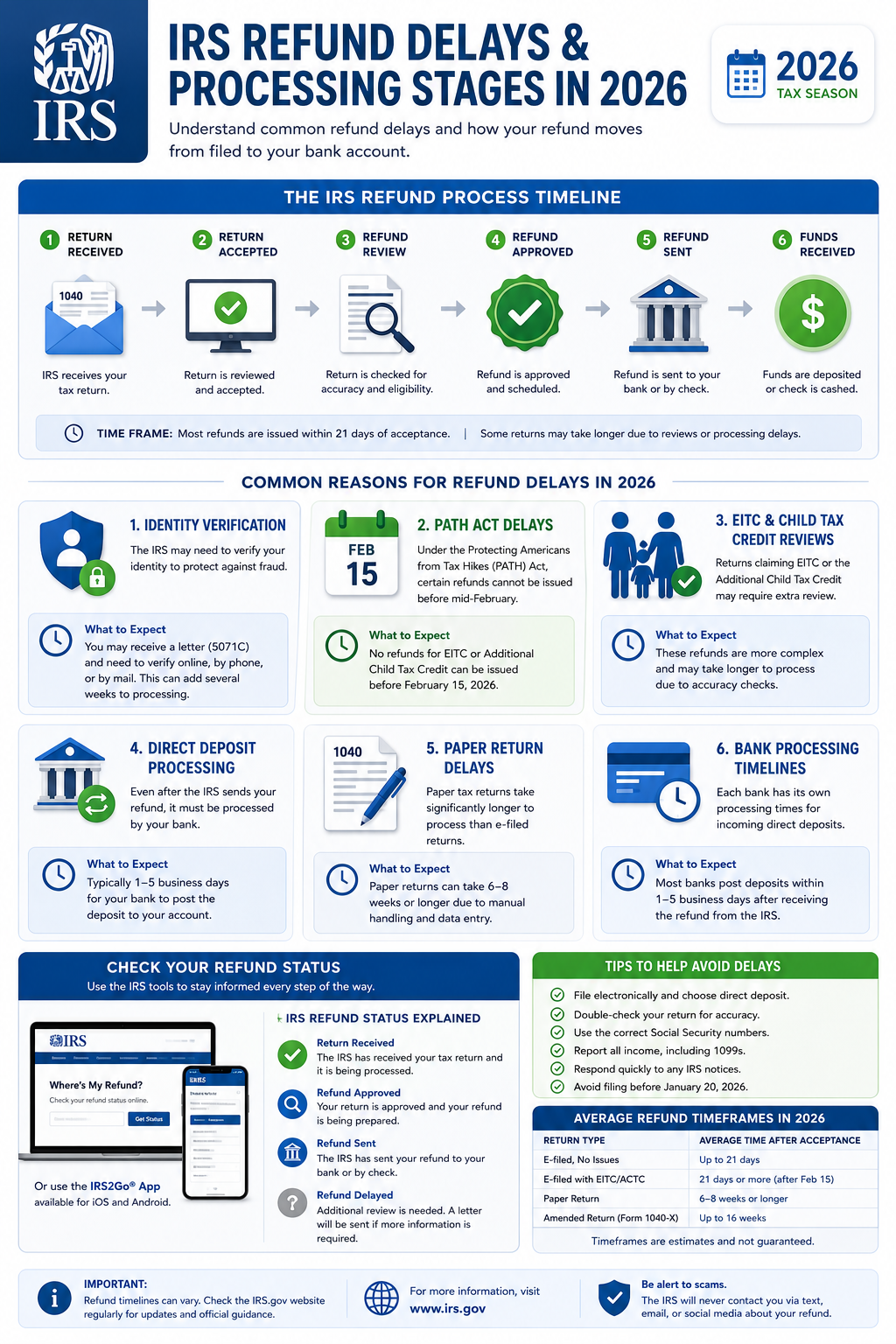
The purpose of the refund tracker is simple: it tells you where your tax return sits in the IRS processing pipeline. Rather than calling the IRS and waiting on hold, you can get an instant status update by providing a few key pieces of information. The tool tracks your return through three distinct stages—Return Received, Refund Approved, and Refund Sent—which we will explore in detail throughout this guide.
IRS guidance explains that the Where's My Refund tool is the most reliable and fastest way to check your federal refund status. It is free, secure, and available 24 hours a day, seven days a week. H&R Block also provides educational refund-tracking explanations and refund status guidance for taxpayers who want additional context, but the official IRS tool remains the definitive source of truth.
How to Track Your IRS Refund Step-by-Step
Tracking your IRS refund is a straightforward process that takes just a few minutes. Follow these steps carefully to ensure you get an accurate status update.

Visit the Official IRS Website or Open IRS2Go
Go directly to IRS.gov/refunds in your web browser. Alternatively, download and open the IRS2Go mobile app on your smartphone. The IRS recommends using the official website or app to avoid phishing scams and third-party sites that may not be secure. Never enter your personal information on any site other than IRS.gov.
Click on "Check Your Refund" or "Where's My Refund?"
On the IRS refunds page, locate and click the button labeled "Check Your Refund" or "Where's My Refund?" This will take you to the secure refund status portal. The IRS notes that this tool is available in both English and Spanish.
Enter Your Information Accurately
You will need to enter your Social Security number or Individual Taxpayer Identification Number, your filing status, and the exact refund amount shown on your tax return. Double-check each entry. If any piece of information does not match IRS records, the tool will not be able to display your refund status.
Submit and Review Your Status
Click submit. The tool will display one of the three refund status stages. Read the message carefully. If the tool shows a specific date for when your refund will be issued, note that date. If it shows "still processing," your return may be under additional review.
The IRS refund tracker updates once every 24 hours, generally overnight between midnight and 6 a.m. Eastern Time. There is no benefit to checking more than once per day. In fact, the IRS explicitly advises taxpayers to check only once daily to avoid unnecessary frustration.
What Information You Need to Check Your Refund
Before you begin, gather these three essential items. Without all three, the IRS refund tracker will not be able to pull up your record.
Social Security Number or ITIN
Enter the Social Security number or Individual Taxpayer Identification Number exactly as it appears on your tax return. This is the primary identifier the IRS uses to locate your account. If you filed jointly, use the SSN of the primary taxpayer listed first on the return.
Filing Status
Select the filing status you used on your tax return: Single, Married Filing Jointly, Married Filing Separately, Head of Household, or Qualifying Widow(er). This must match exactly. Choosing the wrong status is a common reason the tool fails to find a return.
Exact Refund Amount
Enter the refund amount in whole dollars only—no cents. Find this number on your tax return copy. For Form 1040, it appears on the refund line. Even a small discrepancy will prevent the tool from displaying your status. Round down to the nearest dollar.
If you do not have a copy of your tax return handy, check the confirmation email from your tax software or contact your tax preparer. The IRS cannot provide your refund amount over the phone before your return is fully processed.
Understanding IRS Refund Status Messages
The IRS Where's My Refund tool displays one of three main status messages. Each message corresponds to a specific stage in the processing pipeline. Understanding what each status means helps you set realistic expectations and reduces anxiety while you wait. Below is a detailed breakdown of all three stages.
Return Received – What It Means
Return Received is the first stage. When you see this status, it means the IRS has successfully received your tax return and it has entered the processing queue. At this point, the IRS is reviewing your return for basic completeness—checking that all required forms are attached, Social Security numbers are valid, and signatures are present. It does not mean your refund has been approved yet.
This stage typically lasts anywhere from a few days to a few weeks for e-filed returns. For paper returns, it can take considerably longer—often four to six weeks just to show up as "received" in the system. If your status remains on "Return Received" for more than 21 days after e-filing, it may indicate that the IRS needs additional time to review your return. This does not automatically mean something is wrong, but it is worth monitoring.
During this stage, the IRS may send you a notice or letter if they need more information. Check your mail regularly and respond promptly to any IRS correspondence to avoid further delays.
Refund Approved – What It Means
Refund Approved is the second stage and the one most taxpayers are eager to see. This status means the IRS has completed its review of your tax return and has determined that you are indeed owed a refund. The IRS has calculated your refund amount and approved it for payment. At this stage, the Where's My Refund tool will typically display a scheduled refund issuance date—a specific date when the IRS plans to release your refund.
Seeing "Refund Approved" is a strong positive signal. It means no issues were found with your return, no additional review is needed, and the IRS is preparing to send your money. For direct deposit recipients, the funds are usually released on or shortly before the scheduled date. For paper check recipients, the check is mailed on or around that date.
It is important to understand that "Refund Approved" does not mean the money is already in your bank account. There is still a final step: the actual disbursement. The scheduled date is the IRS's target, and while they are generally reliable, bank processing times can add a few extra days.
Refund Sent – What It Means
Refund Sent is the third and final stage. This status confirms that the IRS has released your refund payment. If you chose direct deposit, the funds have been electronically transmitted to your financial institution. The IRS notes that it may take 1 to 5 business days for your bank or credit union to post the deposit to your account, depending on their processing policies. If you chose a mailed paper check, the check has been sent to the mailing address on your tax return and may take several weeks to arrive.
If your status shows "Refund Sent" but the money has not appeared in your account after five business days, contact your bank first. If your bank confirms they have not received the deposit, you may need to request a refund trace from the IRS. A refund trace is a formal process the IRS uses to track down payments that may have been lost, misdirected, or returned.
For paper check refunds, the IRS advises waiting at least four weeks after the mailing date before requesting a trace, as postal delivery times vary significantly depending on your location and USPS service levels.
Common Reasons IRS Refunds Get Delayed
Not all refunds arrive within the standard 21-day window. Many factors can slow down processing. Understanding these common causes helps you identify whether your situation may involve a delay and what, if anything, you can do about it.
| Delay Cause | What Happens | What You Can Do |
|---|---|---|
| Math errors or incorrect entries | The IRS must manually review and correct the return, adding days or weeks. | Double-check your return before filing. Use tax software to reduce errors. |
| Missing or incomplete information | The IRS sends a notice requesting the missing information. Processing pauses until you respond. | Respond to IRS notices quickly and provide exactly what is requested. |
| Identity verification required | The IRS flags the return for potential identity theft and requires you to verify your identity. | Follow the instructions in the IRS letter. You may need to use the IRS Identity Verification Service. |
| PATH Act holds (EITC/ACTC) | Returns claiming Earned Income Tax Credit or Additional Child Tax Credit cannot be issued before mid-February. | No action needed. This is a legal requirement. Expect refunds starting late February. |
| Paper filing | Paper returns require manual data entry and take significantly longer than e-filed returns. | E-file whenever possible. If you filed on paper, expect 6–8 weeks or longer. |
| Bank account errors | Incorrect routing or account numbers cause the deposit to fail and the refund to be returned to the IRS. | The IRS will mail a paper check to the address on your return. This can add weeks. |
| Prior tax debt or offsets | The Bureau of the Fiscal Service may offset your refund for unpaid federal or state debts. | You will receive a notice explaining the offset. Contact the BFS for details. |
According to IRS guidance, the most common cause of refund delays is simple: the return needs additional review. This does not necessarily mean you made a mistake. Sometimes the IRS selects returns randomly for extra scrutiny. If your refund is delayed, the best course of action is patience and regular daily checks of the Where's My Refund tool. Calling the IRS is generally not productive until at least 21 days have passed since e-filing or 6 weeks since mailing a paper return.
IRS Refund Timeline (2026)
Knowing the typical IRS refund processing timeline helps you set realistic expectations. Below is a general overview based on official IRS processing guidance for the 2026 tax season.
E-File with Direct Deposit
Most refunds are processed within 21 days. Many taxpayers receive their refund in as little as 10–14 days. This is the fastest option.
E-File with Paper Check
Processing takes approximately 4 to 6 weeks. The additional time accounts for check printing and mailing through USPS.
Paper File with Direct Deposit
Expect 6 to 8 weeks or longer. Paper returns must be manually transcribed by IRS employees before processing can begin.
Paper File with Paper Check
This combination takes the longest—typically 8 weeks or more. Both the manual data entry and the physical check mailing add significant time.
Amended Returns
Amended returns (Form 1040-X) take 16 weeks or longer. These require manual review and cannot be tracked through the standard Where's My Refund tool.
These timelines are based on IRS guidance and reflect typical processing scenarios. Actual times can vary based on IRS workload, staffing levels, and the complexity of your individual return. The IRS recommends allowing additional time during peak filing season—late January through mid-April—when the agency receives the highest volume of returns.
How to Track an Amended Return
If you filed an amended tax return using Form 1040-X, the standard Where's My Refund tool will not work for tracking purposes. Instead, the IRS provides a separate tool called "Where's My Amended Return?" available on IRS.gov. You can access it directly or through the IRS2Go app.
Amended returns take significantly longer to process than original returns. According to IRS guidance, you should allow 16 weeks or longer for processing. The Where's My Amended Return tool tracks your amended return through three stages: Received, Adjusted, and Completed. You will need your Social Security number, date of birth, and ZIP code to access the tool.
It is important to note that even if your amended return results in an additional refund, the processing time remains lengthy. The IRS manually reviews every amended return, which contributes to the extended timeline. If the tool shows no update after 16 weeks, you can call the IRS for a status update.
IRS2Go Mobile App Overview
IRS2Go is the official mobile application of the Internal Revenue Service, available for both iOS and Android devices. The app puts the Where's My Refund tool—along with several other IRS services—right on your smartphone. According to the IRS, the app provides the same refund status information as the web-based tool, updated once every 24 hours.
Beyond refund tracking, IRS2Go allows you to make tax payments, access free tax preparation resources, and stay updated with IRS news and tax tips. The app is free to download and use. It is a convenient option for taxpayers who prefer mobile access over a desktop browser. Just like the web tool, you will need your SSN, filing status, and refund amount to check your status.
The IRS recommends downloading IRS2Go only from official app stores—the Apple App Store or Google Play—to ensure you are using the legitimate application and not a fraudulent copy. Scammers sometimes create fake IRS apps to steal personal information, so always verify you are downloading the official version published by the Internal Revenue Service.
Common Refund Problems & Solutions
Sometimes the refund process does not go as smoothly as expected. Here are some common issues taxpayers encounter and practical steps to resolve them.
Status Not Updating
If your refund status has not changed for more than 21 days after e-filing, your return may need additional review. Check for IRS notices in the mail. If you have received no communication, you can call the IRS directly. Have your tax return copy handy when you call.
Refund Approved But Not Received
If the tool shows "Refund Sent" but the money has not arrived after 5 business days for direct deposit, contact your bank first. If your bank confirms no deposit was received, you can request a refund trace from the IRS using Form 3911.
Refund Amount Different Than Expected
If your refund is smaller than you anticipated, the IRS may have made an adjustment or an offset may have been applied. You will receive a notice explaining any changes. Common reasons include math error corrections, unpaid child support, or past-due federal debts.
Where's My Refund Says "No Information Found"
This can happen if your return was only recently filed and has not yet been entered into the system. For e-filed returns, wait 24 to 48 hours after filing before checking. For paper returns, wait at least 4 weeks. Double-check that you entered all three pieces of information correctly.
Calculate Your Real Take-Home Pay in Seconds
Understanding your tax refund starts with understanding your paycheck. See exactly how taxes, deductions, and withholdings affect what you actually take home. Use our free paycheck calculator to get a clear picture of your earnings after taxes.
Try the Paycheck Calculator NowTips to Get Your Refund Faster
While you cannot control IRS processing speeds, you can take steps to minimize delays and receive your refund as quickly as possible. Here are the most effective strategies, based on IRS recommendations and tax industry best practices.
- E-file your return. Electronically filed returns are processed much faster than paper returns. The IRS strongly encourages e-filing for speed and accuracy.
- Choose direct deposit. Direct deposit is the fastest way to receive your refund. The IRS can deposit funds directly into checking, savings, or certain prepaid accounts.
- Double-check your return for errors. Simple mistakes—like transposed Social Security numbers or incorrect bank account digits—cause significant delays. Review everything carefully before submitting.
- File early in the tax season. Filing before the April rush means your return enters a less crowded processing pipeline, often resulting in faster turnaround times.
- Use tax preparation software. Reputable software catches errors, performs calculations automatically, and guides you through the filing process to reduce the risk of mistakes.
- Respond to IRS notices immediately. If the IRS sends you a letter requesting information, respond as quickly as possible. Delays in your response directly extend your refund wait time.
H&R Block and other tax preparation services offer refund tracking explanations and can help taxpayers understand where their refund stands. However, for the most current and authoritative information, the IRS Where's My Refund tool remains the gold standard. If you want to understand how your tax refund relates to your overall paycheck withholdings, try using a salary after taxes calculator to see the full picture.
While you are managing your tax documents and financial paperwork, you might find free online tools useful for other tasks. FreeAiden offers free AI-powered tools including QR code generators, barcode generators, PDF converters, image tools, and productivity utilities that can help streamline your document management needs during tax season and beyond.
IRS Refund: How to Track My IRS Refund Status – FAQs
How do I track my IRS refund status?
Use the official IRS "Where's My Refund?" tool at IRS.gov/refunds or the IRS2Go mobile app. You need your Social Security number or ITIN, filing status, and exact refund amount. The tool updates once every 24 hours, usually overnight. Most e-filed returns with direct deposit are processed within 21 days.
Why is my IRS refund delayed?
IRS refund delays can happen for several reasons: the return may need additional review, there could be errors or missing information, identity verification may be required, or the return may include claims for the Earned Income Tax Credit or Additional Child Tax Credit which are held under the PATH Act until at least mid-February. Paper-filed returns also take significantly longer to process than e-filed returns.
What does "Return Received" mean on the IRS refund tracker?
"Return Received" is the first stage. It means the IRS has received your tax return and it is in the processing queue. The IRS is reviewing your return for completeness and accuracy. It has not yet been approved for a refund. This is the stage where most delays occur if additional review is needed.
What does "Refund Approved" mean?
"Refund Approved" means the IRS has finished processing your return and determined you are owed a refund. The IRS has approved the amount and is preparing to send payment. The tool typically shows a scheduled refund issuance date at this stage. This is the second of the three tracking stages.
What does "Refund Sent" mean?
"Refund Sent" is the final stage. The IRS has released your refund payment. For direct deposit, funds have been sent to your bank and may take 1–5 business days to post. For paper checks, the check has been mailed and may take several weeks to arrive depending on USPS delivery times.
How long does the IRS take to send refunds in 2026?
According to IRS guidance, most e-filed tax returns with direct deposit are processed within 21 days. Paper-filed returns typically take 6 to 8 weeks or longer. Returns claiming EITC or ACTC cannot be issued before mid-February due to the PATH Act. Amended returns may take 16 weeks or more.
Can I track an amended tax return refund?
Yes. The IRS provides a separate tool called "Where's My Amended Return?" at IRS.gov. You can track the status of Form 1040-X using this tool. Amended returns generally take 16 weeks or longer to process. The standard Where's My Refund tool only tracks original returns.
What if my refund status says still processing?
If your refund status shows "still processing," the IRS is continuing to review your return. This could indicate additional scrutiny, a math error, or information needing verification. The IRS may send a notice. If the status has not changed for more than 21 days after e-filing, you can call the IRS for an update.
What information do I need to check my refund status?
You need three things: your Social Security number or ITIN, your filing status as shown on your return, and the exact refund amount you claimed in whole dollars. All three must match IRS records exactly. Even a small discrepancy will prevent the tool from displaying your status.
Why does the IRS refund tracker change?
The IRS refund tracker updates as your return moves through the three processing stages: Return Received, Refund Approved, and Refund Sent. The tool updates once every 24 hours, typically overnight. A status change means your return has advanced to the next stage of processing.
Disclaimer
This article is provided for general educational and informational purposes only. IRS processing times may vary based on individual circumstances, IRS workload, and other factors beyond any taxpayer's control. Refund delays can and do happen. Every tax situation is unique. The information presented here should not be construed as tax, legal, or financial advice. Readers should verify all details directly with the Internal Revenue Service or a qualified tax professional before making decisions based on this content. All refund guidance and timelines discussed align with official IRS guidance and educational tax resources available as of 2026.
Understanding Your IRS Refund Status
Tracking your IRS refund status does not have to be a confusing or stressful experience. The official Where's My Refund tool gives you direct access to the same information IRS phone representatives would provide—available 24 hours a day without the hold times. By understanding the three processing stages, knowing what information you need, and recognizing common delay causes, you can navigate the refund process with clarity and confidence.
The key takeaways are simple: e-file your return, choose direct deposit, check the refund tracker once per day, and be patient. Most refunds arrive without issues. If a delay occurs, knowing what to look for and how to respond makes all the difference. Keep your tax return copy accessible, watch for IRS notices, and do not hesitate to use the official tools the IRS provides.
While you wait for your refund, take a moment to understand your broader financial picture. Knowing your actual take-home pay helps you plan better, budget smarter, and avoid surprises at tax time. Use our paycheck calculator to calculate your take-home pay and see exactly how taxes affect your earnings. A few minutes of planning now can save you hours of worry later.
See How Taxes Affect Your Paycheck Instantly
Stop guessing what your real take-home pay looks like. Our free calculator shows you exactly where your money goes—federal tax, state tax, Social Security, Medicare, and more—so you can plan with confidence.
Calculate Your Take-Home Pay Now