


W-9 Form: What It Is and How to Fill It Out
Understanding IRS Form W-9 is essential for anyone who works as an independent contractor, freelancer, or self-employed individual. If a business has ever asked you to complete a "W-9 form," you might have wondered what this document actually is, why it matters, and how to fill it out correctly. You are not alone. The W-9 Form: What It Is and How to Fill It Out guide below covers every detail you need, using official IRS guidance as the foundation.
This guide is based on official IRS Form W-9 instructions and educational tax resources. Every explanation here aligns with the information published by the Internal Revenue Service at irs.gov/forms-pubs/about-form-w-9. You will learn exactly what the form is used for, who must complete it, how to handle backup withholding, and how Form W-9 connects to 1099 tax reporting.
Get the Official Form W-9
Download the latest IRS Form W-9 directly from the Internal Revenue Service before you begin. Keep it handy while you follow the step-by-step instructions below.
Download Form W-9 (IRS PDF)This PDF is the official form from the IRS. Review the instructions carefully before submitting.
Table of Contents
- What Is Form W-9?
- Who Needs to Fill Out a W-9?
- When Is a W-9 Required?
- Why Businesses Request Form W-9
- How to Fill Out a W-9 Step-by-Step
- Line-by-Line W-9 Instructions
- Taxpayer Identification Number (TIN) Explained
- Social Security Number vs EIN
- Backup Withholding Rules Explained
- W-9 vs 1099 Differences
- Common W-9 Mistakes to Avoid
- Can You Submit a W-9 Electronically?
- How Freelancers and Contractors Use W-9 Forms
- Download Official Form W-9
- W-9 Form: What It Is and How to Fill It Out – FAQs
- Disclaimer
- About the Author
- What You Should Know About Form W-9
What Is Form W-9?
Form W-9 is officially titled "Request for Taxpayer Identification Number and Certification." It is a one-page IRS document that collects key identifying information from a taxpayer. Businesses use the completed W-9 to obtain a person's or entity's correct Taxpayer Identification Number, which can be a Social Security Number or an Employer Identification Number. According to the IRS, the form helps ensure accurate information reporting to the federal government.
Unlike many other IRS forms, you do not send Form W-9 to the IRS yourself. Instead, you submit it to the business or payer that requested it. That business keeps your W-9 on file and uses your TIN to prepare information returns such as Form 1099-NEC or Form 1099-MISC when they pay you $600 or more during the tax year. IRS guidance explains that the W-9 serves as a certification that the TIN you provide is correct and that you are not subject to backup withholding.
Think of Form W-9 as a foundational tax document. Without it, the businesses you work with cannot properly report payments to the IRS, which can create tax complications for both parties. The form is relatively short, but every section matters. Taking a few minutes to fill it out accurately protects your tax standing and keeps your client relationships running smoothly.
Who Needs to Fill Out a W-9?
If you receive payments as a non-employee, there is a strong chance you will need to complete a W-9 form at some point. The IRS identifies several groups that commonly fill out this form. Independent contractors, freelancers, and gig workers are the most frequent users. Sole proprietors who operate under their own name or a trade name also complete W-9 forms when clients request them. Additionally, limited liability companies that are treated as disregarded entities or partnerships for tax purposes use Form W-9 to provide their EIN to payers.
Businesses themselves may also need to fill out W-9 forms. If your company provides services to another business, that client may ask you for a completed W-9 before processing your first payment. Trusts, estates, and certain tax-exempt organizations use the form as well when they receive reportable payments. In short, any person or entity that receives payments a business must report to the IRS on a 1099 form should be prepared to submit a W-9.
If you are an employee receiving a W-2, you do not need a W-9 for that job. Employees fill out Form W-4 instead. The W-9 is strictly for non-employee compensation and certain other reportable payments. Understanding this distinction helps you avoid confusion when onboarding with a new client or business partner.
When Is a W-9 Required?
A business typically requests a W-9 before making its first payment to you. This is standard practice in client and vendor onboarding. The IRS recommends that payers collect Form W-9 before any reportable payment is made. Common situations that trigger a W-9 request include starting a freelance contract, signing up as a vendor with a company, earning interest income from a financial institution, or receiving rental income managed by a property manager. Even real estate transactions and mortgage interest reporting can involve a W-9 request.
Banks and investment firms also use Form W-9 to collect TINs from account holders. If you open a new interest-bearing account, the bank may ask for a completed W-9 to ensure they can report your interest income correctly. The IRS requires financial institutions to file Form 1099-INT for interest payments above a certain threshold, and they need your TIN to do that. Similarly, dividend payments and certain royalty payments trigger W-9 collection requirements.
If you are unsure whether a W-9 request is legitimate, consider the context. Legitimate businesses ask for W-9 forms when they expect to pay you amounts that will require 1099 reporting. If a random individual or suspicious entity asks for your SSN on a W-9 without a clear business purpose, exercise caution and verify their identity before sharing sensitive information.
Why Businesses Request Form W-9
Businesses request Form W-9 because the IRS requires them to report certain payments to independent contractors, vendors, and other non-employees. When a company pays a freelancer $600 or more in a calendar year, they must file a Form 1099-NEC with the IRS and send a copy to the contractor. To complete that 1099 accurately, the business needs the contractor's legal name, address, and TIN. All of this information comes directly from the W-9.
There is also a compliance angle. If a business fails to collect a valid W-9 and later cannot provide a correct TIN on a 1099, the IRS may impose penalties. In some cases, the business may be required to begin backup withholding at a rate of 24% on future payments. Collecting Form W-9 upfront protects the business from these risks and demonstrates good-faith compliance with IRS information reporting rules.
Beyond compliance, W-9 collection is part of standard accounting and vendor management. Companies keep W-9 forms in their records to support their tax filings in the event of an audit. When you submit a W-9 promptly and accurately, you make it easier for your clients to pay you on time and keep their books in order. It is a small step that builds professional trust.
How to Fill Out a W-9 Step-by-Step
Filling out Form W-9 is straightforward once you understand each section. Below is a practical walkthrough of the entire form. Take your time and double-check every entry before submitting it to a client. Errors on your W-9 can lead to mismatched TIN notices from the IRS and potential backup withholding issues.
The form begins with your name. Use the exact legal name that matches your tax return and your Social Security card. If you operate a business under a different name, you will enter that on the next line. The IRS matches the name and TIN combination against its records, so even small discrepancies can cause problems.
After the name section, you check a box indicating your federal tax classification. Most freelancers and independent contractors check the "Individual/sole proprietor or single-member LLC" box. This tells the payer how to classify your earnings for reporting purposes. If you operate as a corporation, partnership, or trust, you check the appropriate box. Choosing the wrong classification can lead to incorrect 1099 reporting.
The address section asks for your street address, city, state, and ZIP code. Use the address where you receive tax correspondence. This is the address that will appear on the 1099 form your client sends you at year-end. If you move during the year, notify your clients and submit an updated W-9 to avoid missing important tax documents.
Part I of the form is where you enter your Taxpayer Identification Number. Most individuals use their Social Security Number. If you have an EIN for your business, you may use that instead. Only enter one TIN. The IRS instructions state clearly that you should not enter both numbers. After entering your TIN, sign and date the form in Part II to certify that the information is correct.
Form W-9 Visual Reference
Line-by-Line W-9 Instructions
The IRS provides detailed line-by-line instructions with Form W-9, and reviewing them before you fill out the form is a smart habit. Line 1 asks for your name as shown on your income tax return. For most individuals, this is the name on your Social Security card. If you recently changed your name due to marriage or another reason, make sure the Social Security Administration has updated its records before you use the new name on a W-9.
Line 2 is for your business name or disregarded entity name. If you are a sole proprietor who uses a trade name or "doing business as" name, enter it here. Leave this line blank if you operate solely under your personal name. For single-member LLCs that are disregarded for tax purposes, enter the LLC name on Line 2 while your personal name appears on Line 1.
Line 3 contains the federal tax classification checkboxes. The options include individual/sole proprietor, C corporation, S corporation, partnership, trust/estate, and limited liability company. If you check the LLC box, you must also specify the LLC's tax classification. IRS guidance emphasizes that this classification determines how your payments are reported. Most freelancers check the first box.
Line 4 deals with exemption codes. The vast majority of individuals leave this line blank. Exemption codes apply to certain payees such as tax-exempt organizations, governments, and corporations that are exempt from backup withholding or FATCA reporting. If you are a freelancer or independent contractor, you almost certainly do not need to enter anything on Line 4.
Lines 5 and 6 capture your mailing address. Enter your street address, apartment or suite number, city, state, and ZIP code. This address is used for delivering your annual 1099 forms. If you use a post office box for tax correspondence, you may enter it here. Just make sure it is an address where you reliably receive mail throughout the year.
Part I is where you provide your Taxpayer Identification Number. For individuals, this is your nine-digit Social Security Number. Enter it carefully. A single transposed digit can cause your 1099 to be rejected by the IRS. If you have an Employer Identification Number, you may use it here instead. The IRS instructions are clear: do not enter both an SSN and an EIN on the same W-9. Choose one.
Part II is the certification section. By signing here, you attest under penalty of perjury that the TIN you entered is correct, that you are not subject to backup withholding, and that you are a U.S. person for tax purposes. Sign and date the form. An unsigned W-9 is invalid, and the payer may not accept it.
Download Your Official Form W-9
Need a fresh copy? Grab the official IRS Form W-9 PDF to fill out or update your records. This is the same form businesses expect.
Download Form W-9 (IRS PDF)This download links directly to the IRS. Review the form instructions before submitting.
Taxpayer Identification Number (TIN) Explained
A Taxpayer Identification Number, or TIN, is the identifier the IRS uses to track your tax obligations. For most individuals, the TIN is simply their Social Security Number. The SSN is issued by the Social Security Administration and serves as your primary tax identifier for life. When you fill out a W-9 as a freelancer or independent contractor, you typically enter your SSN in Part I.
Businesses and certain other entities use an Employer Identification Number instead. The EIN is a nine-digit number issued by the IRS that functions like a Social Security Number for a business. If you operate as a sole proprietor and have not obtained an EIN, your SSN is sufficient. However, some sole proprietors choose to get an EIN to avoid sharing their SSN with multiple clients. The IRS permits this, and you can apply for an EIN online at no cost through the IRS website.
According to the IRS, it is critical that the name and TIN combination on your W-9 exactly matches what the agency has on file. If you use a middle initial on your tax return but omit it on the W-9, or if your last name has changed and the SSA has not been notified, the IRS may flag a mismatch. These mismatches can result in backup withholding or notices to both you and the payer.
Social Security Number vs EIN
Deciding whether to use your Social Security Number or an Employer Identification Number on Form W-9 depends on your business structure. If you are a sole proprietor with no employees and you operate under your own name, using your SSN is perfectly acceptable and the most common approach. Many freelancers and independent contractors use their SSN on W-9 forms throughout their entire careers without any issues.
However, using an EIN offers a layer of privacy. When you give a client your SSN on a W-9, that number sits in their records. If the client's systems are ever compromised, your SSN could be exposed. An EIN reduces this risk because it is tied to your business rather than your personal identity. The IRS makes it easy to obtain an EIN, and sole proprietors can apply in minutes through the IRS website.
There is also a practical consideration. If you plan to open a business bank account, hire employees, or establish business credit, you will likely need an EIN. Even if none of those apply today, having an EIN ready can streamline future business growth. The choice is yours, but whichever number you use, be consistent across all your client W-9 submissions to avoid confusion during tax season.
Backup Withholding Rules Explained
Backup withholding is one of the most misunderstood aspects of Form W-9. The IRS defines backup withholding as a mandatory tax withholding that a payer must apply to certain payments when the payee fails to provide a correct TIN or when the IRS notifies the payer that the payee's TIN does not match its records. The current backup withholding rate is 24 percent. This means that if backup withholding applies to you, 24 percent of each payment is sent directly to the IRS instead of being paid to you.
Most people are not subject to backup withholding, and by signing the W-9 certification in Part II, you are declaring that you are exempt. However, backup withholding can be triggered if you provide an incorrect TIN, if the IRS notifies the payer of a TIN mismatch, or if you fail to furnish a TIN altogether. The IRS recommends that payers begin backup withholding immediately if they receive a notice from the IRS about a payee's TIN.
If backup withholding has been applied to your payments, you can claim the withheld amount as a credit on your annual tax return. It is not an additional tax. Think of it as a forced prepayment toward your tax liability. To stop backup withholding, you need to resolve the underlying issue with the IRS, which usually involves providing documentation that your TIN is correct. Once resolved, the IRS will issue a notice to the payer to stop withholding.
W-9 vs 1099 Differences
Form W-9 and Form 1099 are closely related but serve entirely different purposes. Understanding the distinction is essential for anyone working as an independent contractor. A W-9 is a form you fill out and give to a business that pays you. A 1099 is a form the business fills out and sends to both you and the IRS at year-end. The W-9 provides the information the business needs to complete the 1099 accurately.
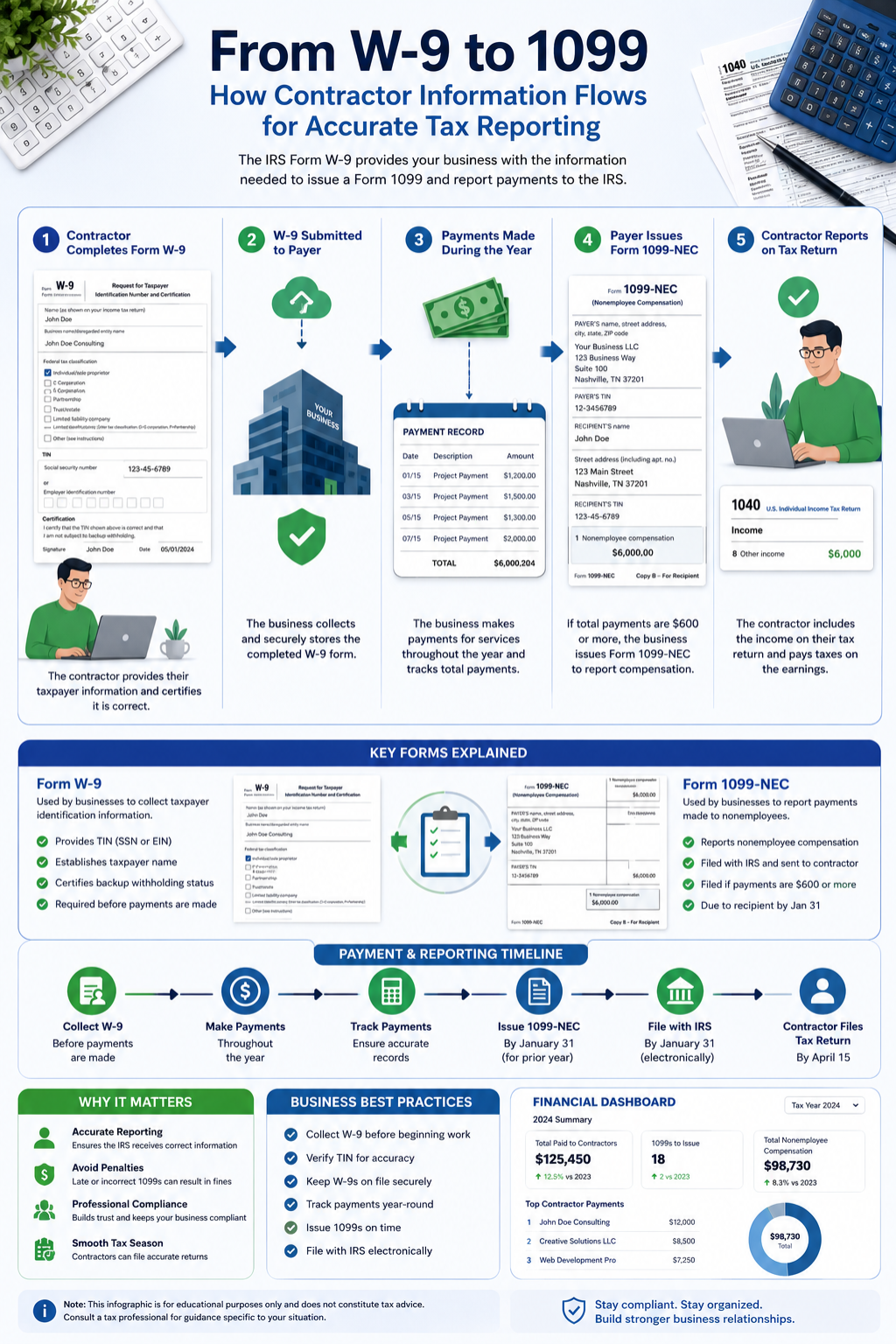
Put simply, the W-9 is an input document and the 1099 is an output document. The W-9 collects your taxpayer information. The 1099 reports how much you were paid. One stays with the business. The other goes to the IRS. This relationship is why businesses are so diligent about collecting W-9 forms before paying contractors. Without a W-9, they cannot file a correct 1099.
| Feature | Form W-9 | Form 1099-NEC |
|---|---|---|
| Who completes it | Contractor / payee | Business / payer |
| Sent to IRS | No | Yes |
| Purpose | Provide TIN and certification | Report payments made |
| When | Before first payment | By January 31 each year |
| Contains payment amounts | No | Yes |
| Signature required | Yes | No (payer's info only) |
Form W-9
Completes W-9
W-9 Securely
Contractor
Files 1099-NEC
The W-9 to 1099 reporting flow as recommended by IRS guidance.
Common W-9 Mistakes to Avoid
Filling out a W-9 seems simple, but mistakes are surprisingly common. One frequent error is entering a name that does not match IRS records. If you use a nickname or abbreviated name on the W-9 while your tax return uses your full legal name, the IRS may reject the 1099 filing. Always use your exact legal name as it appears on your Social Security card or most recent tax return.
Another common mistake is selecting the wrong federal tax classification. Many single-member LLC owners mistakenly check the LLC box without also indicating their tax classification, or they incorrectly check "corporation" when they are actually taxed as a sole proprietor. Take an extra moment to review the classification options and choose the one that matches how you file your taxes. IRS guidance provides a helpful decision chart in the W-9 instructions.
Entering an incorrect TIN is also a major problem. Transposing digits, omitting a digit, or entering an EIN when the IRS expects an SSN can all trigger backup withholding notices. Double-check your TIN entry character by character. If you are unsure which TIN to use, refer to your prior year tax return or consult the IRS instructions for Form W-9. Finally, do not forget to sign and date the form. An unsigned W-9 is not valid, and many businesses will reject it.
Can You Submit a W-9 Electronically?
Yes, you can submit Form W-9 electronically in most cases. The IRS permits electronic submission of W-9 forms as long as the system used meets certain requirements for authentication and data integrity. Many businesses use secure online portals, encrypted email, or e-signature platforms to collect W-9 forms from contractors. This approach is faster than mailing a paper form and reduces the risk of lost documents.
If you submit a W-9 electronically, make sure the platform you use is secure. Your W-9 contains sensitive personal information, including your SSN or EIN. Avoid sending a completed W-9 through unencrypted email or uploading it to unsecured file-sharing sites. Look for platforms that use encryption and require authentication. Some businesses also accept typed signatures on electronic W-9 forms, but the IRS recommends checking that the electronic signature method complies with applicable regulations.
If a client asks you to use a specific online tool to submit your W-9, verify that the tool is legitimate. Scammers sometimes create fake W-9 collection portals to harvest personal information. When in doubt, contact the client directly using a phone number you trust to confirm the request before submitting your data.
How Freelancers and Contractors Use W-9 Forms
For freelancers and independent contractors, Form W-9 is a routine part of doing business. Every new client who pays you for services will likely ask for a completed W-9. Having a signed, up-to-date W-9 ready to share can speed up your onboarding process and help you get paid faster. Many experienced freelancers keep a PDF copy of their completed W-9 saved securely so they can provide it immediately when a new client requests it.
The W-9 also connects directly to your self-employment tax obligations. When your clients use the information from your W-9 to file 1099-NEC forms, the IRS receives a record of your non-employee income. You are responsible for reporting this income on your tax return and paying self-employment tax on it. Using a paycheck calculator or a salary after taxes calculator can help you estimate how much of your freelance income you will actually take home after taxes, so you can set aside the right amount for quarterly estimated tax payments.
Freelancers should also be aware that Form W-9 is not just for client work. If you earn interest on a business savings account, receive rental income, or get royalty payments, the paying entity may ask you for a W-9. Keeping your W-9 information consistent across all these relationships ensures that all your 1099 forms match up correctly when you file your annual return. This reduces the chance of an IRS inquiry and makes tax time less stressful.
See How Self-Employment Taxes Affect Your Income
Use our free calculator to estimate your take-home pay after taxes and plan your freelance finances with confidence.
Calculate Your Estimated Take-Home Pay InstantlyFreelancers and contractors managing tax documents may also find value in free productivity tools. For example, FreeAiden offers free AI-powered utilities including QR code generators, barcode generators, PDF converters, and image tools that can streamline your document management workflow.
W-9 Form: What It Is and How to Fill It Out – FAQs
Is a W-9 required for freelancers?
Yes, freelancers are almost always required to complete Form W-9 when a client requests it. The form provides the client with the freelancer's TIN and legal name so the client can issue a 1099-NEC at year-end. Without a completed W-9, the client may refuse to process payments or may be required to begin backup withholding. It is a standard and necessary part of freelance business operations.
Can I refuse to fill out a W-9?
You can refuse, but there are consequences. If you decline to provide a completed W-9, the business may withhold 24 percent of your payments for backup withholding and send that money to the IRS. The business may also simply choose not to work with you. Since Form W-9 is a standard IRS requirement for information reporting, refusal signals noncompliance and creates risk for the payer.
What happens if my W-9 information is wrong?
If the information on your W-9 is incorrect, the IRS may notify the payer of a TIN mismatch. The payer may then be required to begin backup withholding at 24 percent on your future payments. Additionally, the 1099 form issued to you may contain errors, which could complicate your tax filing. If you discover an error, submit a corrected W-9 to the payer immediately.
What is backup withholding?
Backup withholding is a mandatory 24 percent tax that a payer withholds from your payments and sends to the IRS when certain conditions are not met. It applies if you fail to provide a correct TIN, if the IRS notifies the payer of a mismatch, or if you do not certify your exemption from backup withholding. The withheld amount is credited toward your total tax liability when you file your annual return.
Is Form W-9 sent to the IRS?
No, Form W-9 is not sent to the IRS by the person filling it out. It is submitted to the business or payer that requests it. The payer keeps the W-9 on file for its records. The IRS only sees the information from your W-9 indirectly when the payer uses it to complete a 1099 form, which is filed with the IRS at year-end. The W-9 itself remains with the requesting business.
Can businesses store W-9 forms electronically?
Yes, businesses can store W-9 forms electronically. The IRS permits electronic storage of W-9 forms as long as the storage system preserves the integrity of the data and the forms can be retrieved when needed, such as during an audit. Many companies use secure cloud-based systems or encrypted databases to store W-9 information. Proper security measures are essential given the sensitive nature of the TIN data on these forms.
What is the difference between a W-9 and W-4?
Form W-9 is for independent contractors, freelancers, and other non-employees. Form W-4 is for employees. A W-4 tells an employer how much federal income tax to withhold from each paycheck. A W-9 provides a TIN to a business so it can report payments on a 1099. Employees never fill out a W-9 for their job. Contractors never fill out a W-4 for their clients. The two forms serve completely different tax reporting systems.
Should I use an EIN or SSN on Form W-9?
As a sole proprietor, you can use either your SSN or an EIN on Form W-9. Using your SSN is simpler and perfectly acceptable. Using an EIN adds a layer of privacy since you do not have to share your personal SSN with clients. If you have employees, a business bank account, or plan to grow your business, obtaining an EIN from the IRS is free and can be done online. Whichever you choose, be consistent across all your client W-9 submissions.
Do sole proprietors need a W-9?
Yes, sole proprietors need to complete Form W-9 when a client or business requests it. Sole proprietors receive non-employee compensation, which businesses must report on Form 1099-NEC. To prepare that 1099, the business needs the sole proprietor's TIN, legal name, and address. Submitting a complete and accurate W-9 ensures proper tax reporting and helps sole proprietors avoid backup withholding issues.
How can I protect my information when submitting a W-9?
Protecting your information starts with verifying the legitimacy of the W-9 request. Only submit your W-9 to known, trusted businesses. Use secure submission methods such as encrypted portals or password-protected files rather than plain email. If you use an EIN instead of your SSN, you limit the exposure of your personal identifier. Always confirm that the recipient has appropriate data security measures in place before sharing your completed form.
Disclaimer
This guide is provided for general educational and informational purposes only. It is based on official IRS Form W-9 instructions and publicly available tax education resources. Tax situations vary widely, and IRS rules and rates may change over time. The information in this article does not constitute legal, tax, or financial advice. You should verify all details directly with the Internal Revenue Service or consult a qualified tax professional before making decisions about your specific tax situation.
What You Should Know About Form W-9
Form W-9 is one of the most frequently encountered IRS documents for freelancers, independent contractors, and self-employed individuals. It is not a tax return and it is not filed with the IRS by you. It is simply a way for businesses to collect your taxpayer information so they can meet their own IRS reporting obligations. When you understand what a W-9 form is and how to fill it out correctly, the process becomes quick and routine rather than stressful or confusing.
Take the time to fill out your W-9 carefully. Use your correct legal name. Double-check your TIN. Sign and date the form before submitting it. If your information changes, submit an updated W-9 to your clients right away. These small habits protect you from backup withholding, TIN mismatch notices, and unnecessary tax season headaches. For additional help managing your freelance finances, calculate your take-home pay with our free paycheck calculator to plan your budget and estimated tax payments effectively.
Take Control of Your Freelance Finances
Knowing how much you actually earn after taxes is the first step to smart financial planning. Try our free calculator today.
Use the Paycheck Calculator Now